ERP Implementation Cost: Factors, Breakdown, and Budget Estimates
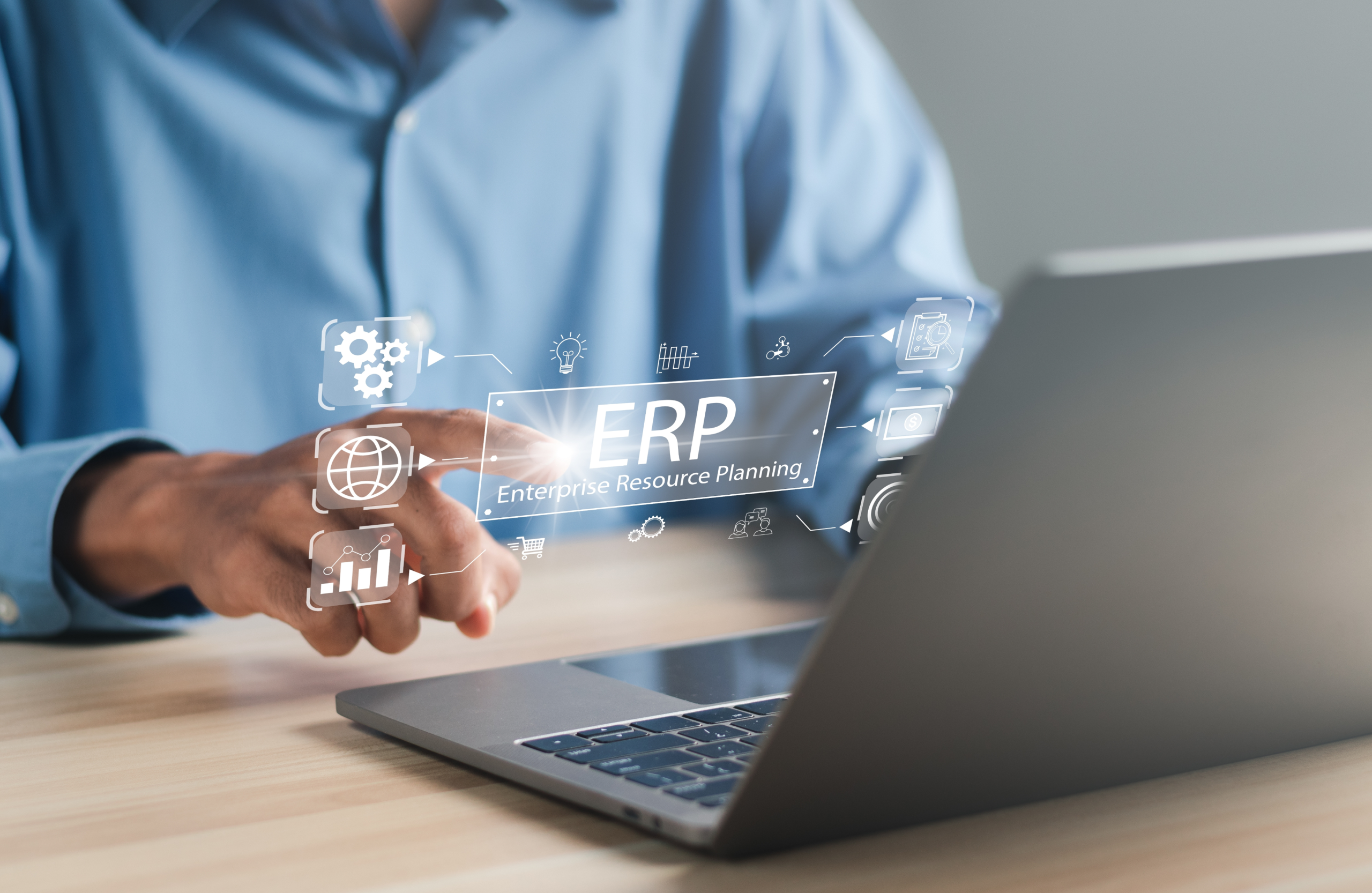

The implementation of a new ERP is a very individual process that can take various forms and have diverse requirements. Depending on the platform’s purpose, scope, and functional complexity, the process may stretch unpredictably.
After all, ERP needs thorough planning, business process analysis, configuration or customization, integrations, and optional data migration. The finished ERP will also require individual sprints of testing and QA, new user onboarding, and go-live and post-launch support.
The cost of ERP implementation is made up of many little factors and can be cut and balanced in many safe ways if you know your options. The ERP implementation cost breakdown below will give you a clear picture of those options, helping you plan an ERP that fits your budget perfectly.
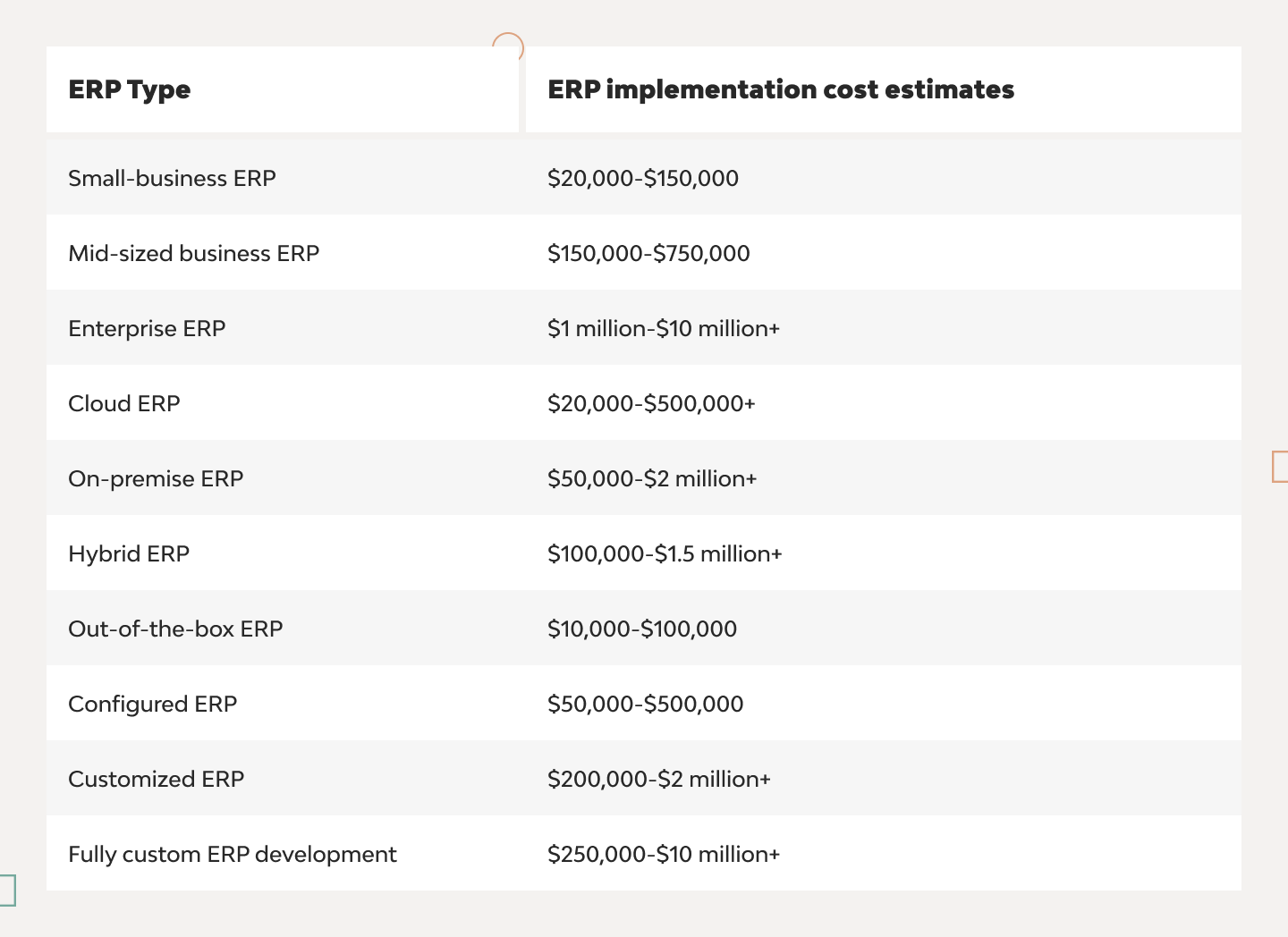
ERP implementation cost ranges
By business size
- Small businesses: $20,000-$150,000
Implementation of core features, like accounting, inventory, and purchasing, takes a shorter deployment timeline and lower-bar costs accordingly. - Mid-sized businesses: $150,000-$750,000
ERP implementation for mid-scale organizations may require extra modules, integrations, and workflow automation.
- Large enterprises: $1 million-$10 million+
Large-scale ERP implementation costs vary widely because an enterprise may need deployment across multiple locations, business units, and regulatory environments.
By deployment type
- Cloud ERP: $20,000-$500,000+
Cloud-based ERP implementation requires lower upfront costs because there is no need for physical servers and on-premises infrastructure to host the ERP system.
- On-premise ERP: $50,000-$2 million+
On-premises ERP deployment, in contrast, requires an investment in servers, infrastructure, installation, and internal IT management to keep systems running reliably.
- Hybrid ERP: $100,000-$1.5 million+
The combination of cloud and on-premises environments can help cut total ERP implementation costs and leverage the flexibility of cloud hosting.
By the implementation approach
- Out-of-the-box ERP: $10,000-$100,000
Usually provides standard functionality with surface-level configuration, several user plans, and limited scalability at the most affordable average ERP implementation cost.
- Configured ERP: $50,000-$500,000
A slightly more tailored and scalable option, configured ERPs come with built-in settings, workflows, and user permissions that are adapted to new business flows without code modifications.
- Customized ERP: $200,000-$2 million+
Customized ERP has a ready-made core architecture, but everything else you can customize — features, workflows, UI/UX layouts, integrations, and user access.
- Custom ERP development: $250,000-$10 million+
Authentic, uniquely tailored software can be achieved by building an ERP from the ground up, handpicking features and investing more upfront to potentially save costs in the long run.
Main factors affecting ERP implementation cost
ERP software type and vendor
The first essential cost-shapers are the overall ERP platform type (out-of-the-box, configured, customized, or fully custom), licensing model (subscription or perpetual), and vendor ecosystem (on-premise, cloud-hosted, or hybrid).
Number of users
The more users, the more expensive the ERP — you will need a reliable foundation to host them, several access levels for different user roles, and onboarding that matches your employee count.
Functional scope and ERP modules
It’s expensive to host many features, especially when you’re implementing complex functionality and integrating extra ERP modules, e.g., for finance management, supply chain connection, or human resources analytics.
Customization requirements
The depth of custom workflows, the number of bespoke features, and the extent of process automation are among the main cost drivers for ERP implementation, each requiring time, skill, and testing window.
Data migration complexity
You may need to migrate data for ERP from legacy systems — the migration volume and amount of effort put into preserving or improving data quality can increase implementation costs accordingly.
Third-party integrations
Connecting the ERP with CRM platforms, accounting software, payment gateways, or other external APIs adds development effort and increases both implementation and ongoing maintenance costs.
Business process complexity
If your organization runs complex operational workflows with cross-departmental processes and multi-level approval chains, you will need to translate them into the ERP, which will require more in-depth process analysis and ERP configuration (and hence higher costs).
Industry-specific requirements
If your ERP is about to operate in a highly regulated industry, such as healthcare or finance, you may need to add specialized functionality and obtain regulatory certifications (via paid certification) to keep up with industry standards.
Deployment model
The way you deploy a new ERP decides a lot cost-wise—projects usually save costs with cloud infrastructure, invest slightly more into the potential ROI of an on-premises environment, or try to achieve a certain balance with hybrid architecture.
Organizational structure and locations
Deploying an ERP can also be costly when you need to install it across several global offices, configure secure access for multiple entities, and enable multi-currency operations for business chains.
User training and change management
Don’t forget to account for the period of user adoption, during which you will need to provide well-structured employee onboarding and possibly create individual training programs for existing staff.
Post-go-live support requirements
Always leave some spare room in your budget for post-launch maintenance, which typically includes active technical support, real-time system monitoring, and on-demand performance optimization.
ERP implementation cost breakdown
- Software licensing costs
The total cost of ERP licenses can grow according to the number of users, selected modules, and ERP vendor policy. Subscription-based pricing models (usually cloud-based) offer more payment flexibility (cheaper but require regular payments), while a perpetual license can be bought upfront (expensive upfront but no regular payments).
- Infrastructure costs
If you run your ERP system in the cloud, your main infrastructure expenses will include regularly consumed cloud resources and extra security measures (usually slightly cheaper). For on-premises (or hybrid) scenarios, you will need to cover server hardware, storage, and networking maintenance (usually slightly costlier).
- Personnel costs
Personnel costs can easily make up to 60% of the total ERP budget — this includes paying your implementation team responsible for planning, configuring, deploying, and supporting the ERP solution. On top of that, you may also need to hire ERP consultants to prepare efficient end-user training activities.
- Ongoing ERP costs
Another 20% of the budget should account for recurring expenses that you will encounter after launch, including maintenance fees, support services, performance optimization, and platform updates. Also, make sure to discuss any scaling plans during early stages of the project.
- Hidden costs
It’s better to be safe than sorry and be ready for indirect expenses (at least 10% of the budget). This may include data preparation before migration, additional process redesign after launch, employee adoption challenges, and compensation of temporary productivity reductions during implementation.
ERP implementation ROI
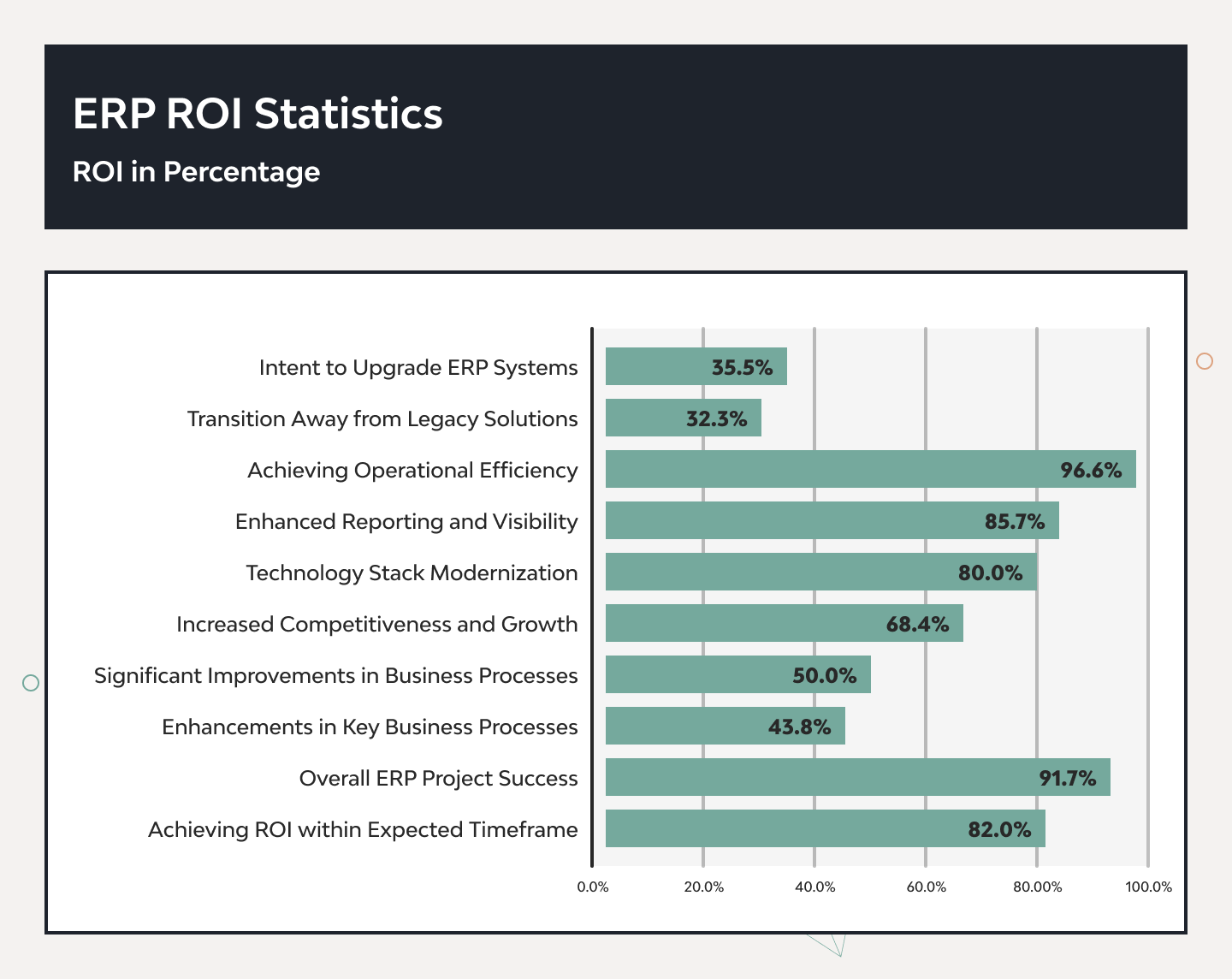
- Improved employee productivity and operational efficiency
The ERP implementation pays off through workflow automation and digitized task management that’s both hyper-accurate and fast. Furthermore, ERP enables centralized data access, standardized processes for no-nonsense workflows, and reduced duplicate work through automation. - Increased employee engagement and retention
A well-tailored ERP offers a personalized employee experience and drives productivity improvements through engagement and operational efficiency. Your personnel thus achieve workload reduction thanks to handy collaboration tools, instant communication, and highly available self-service portals. - Reduced inventory costs and fewer stockouts
An ERP system provides clearer supply chain visibility and integrations for inventory and warehouse management automation. Additional costs can be saved through AI-powered demand forecasting, which enables timely and cost-focused stock optimization. - Faster and smarter decision-making
ERPs turn data to your business and technical advantage through streamlined collection of the data and business intelligence. Namely, the ERP delivers performance monitoring insights with high data accuracy that can be fed instantly into real-time analytics and reported in dashboards. - Enhanced customer satisfaction
ERPs also deliver invaluable customer insights that allow you to personalize experiences and boost service quality in line with relevant demands. You can efficiently grow customer satisfaction by integrating customer relationship management, automating order fulfillment, and providing omnichannel support. - Reduced compliance risks and regulatory penalties
A dedicated ERP helps double down on regulatory compliance by providing an audit-trail system and built-in data governance mechanisms (such as multi-user access). Depending on the feature scope, an ERP can also automate policy enforcement to restrict potential malicious actions and risk management to prevent disputes. - Easier information access and cross-department collaboration
The centralized database and instant access to information enable efficient knowledge sharing and smooth cross-functional communication. Document management, routine updates, and info gaps stop hindering workflows and drive up costs. - Improved security and reduced cybersecurity risks
ERP’s configurable access control and overall prioritized security compliance can save you from potential legal disputes that generate immense costs. In turn, you can boost brand reliability with built-in data encryption, proactive threat monitoring, and custom identity management.
How to reduce ERP implementation costs
- Establish clear requirements: What you need is what you get — make sure to outline major business requirements, stakeholder alignment (who owns what in the project), and required project scope. To save more, turn to experienced specialists for more in-depth process mapping and a structured implementation roadmap.
- Limit customization: Watch your customization scope, as it directly affects the implementation complexity and final maintenance costs. It’s best to settle on all required configuration options and upgrade compatibility beforehand — you may also need a bunch of standard ERP features for your case (and some room for future scaling).
- Prioritize core ERP functionality: Pay special attention to the feature prioritization, putting critical business processes and essential ERP modules first. You can always opt for phased implementation, achieving major budget optimization and faster deployment by postponing additional and advanced features.
- Adopt a phased rollout strategy: Consider incremental deployment to break costs down into smaller budget investments. This way, you can reduce implementation risks and decide on resource allocation directions based on user feedback, meeting demands while investing just enough to maintain business continuity.
- Invest in user adoption: Well-personalized, comprehensive employee training and change management will pay off prettily in the long run. The structured knowledge transfer helps enable efficient system utilization and engages users with tools that really work for them.
Why choose DjangoStars for ERP implementation
ERP consulting expertise
Which solution architecture to choose, and how much does ERP implementation cost exactly for your case? We help figure things out through a personalized ERP strategy built on scrupulous business process analysis, relevant technology assessment, an individual implementation roadmap, and ERP implementation cost comparison.
Custom ERP development capabilities
We have a 17+-year track record of building custom ERP solutions, implementing compliant industry-specific functionality, and delivering scalable architectures for software of all scopes. Our experts tailor ERP-based workflow automation to your specific needs and offer bespoke module development for unique requirements and purposes.
End-to-end ERP implementation services
To set a solid implementation foundation, we provide full ERP planning, from early system configuration and deployment management to pre-launch quality assurance and post-launch user training. This allows us to deliver the most complete and on-point ERP system from the get-go.
ERP integration experience
We can further enhance your ERP’s efficiency in the required direction through CRM integration, accounting software integration, supply chain system, or other industry-specific solutions. We can integrate with existing third-party APIs and build custom ones to synchronize data with any external system you need.
ERP modernization and migration expertise
If you are looking for legacy system modernization, we can ensure you implement only the relevant platform upgrades and align the data migration process with overall system optimization. Namely, we enable partial and full switches to new databases, physical storage, data centers, or custom cloud migrations.
Long-term support and maintenance
DjangoStars’ professionals keep you covered long after the new ERP launch, offering technical support, regular security updates, and insightful performance monitoring. We prioritize continuous optimization and real user feedback-driven system enhancements that boost your platform’s CSAT scores.
Hire experienced developers to build your next project with DjangoStars